
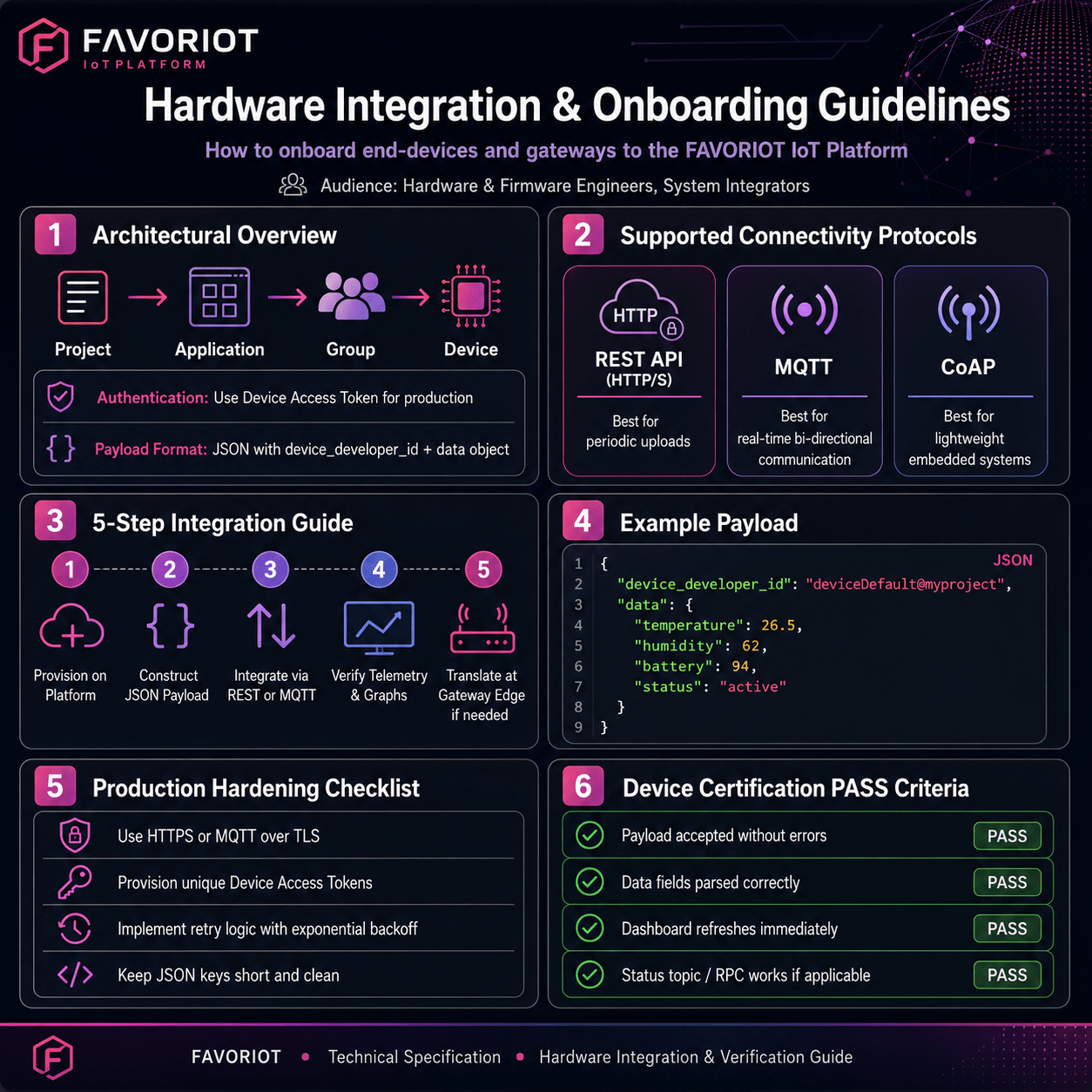
Hardware Integration & Onboarding Guidelines
A technical specification and verification guide for onboarding end-devices and gateways onto the FAVORIOT IoT platform — covering architecture, connectivity protocols, payload structure, and production hardening.
01 Architectural Overview & Integration Model
The Favoriot platform operates on a structured, multi-tenant hierarchy designed to handle large-scale deployments securely and efficiently. To seamlessly offload your telemetry data to our cloud infrastructure and reliably receive downstream commands, devices must map strictly to this topology:
Authentication
All device interactions require authentication. You can use your global Developer API Key for early-stage prototype testing, but production hardware must use the specific Device Access Token generated when a device is registered.
Payload Format
Favoriot natively handles data in JSON format. Your device payload must include the target identifier and a data object mapping your transmission parameters.
02 Supported Connectivity Protocols
Favoriot supports three primary ingress protocols, allowing you to choose the best fit based on your hardware resources, power constraints, and network environment.
| Protocol | Connection Type | Authentication | Optimal Use Case |
|---|---|---|---|
| REST API (HTTP/S) | Request–Response | Header: apikey or Authorization | Cellular (NB-IoT/LTE-M) or Wi-Fi devices uploading data at periodic, longer intervals. |
| MQTT | Publish–Subscribe | Username/Password = Token | Real-time, bi-directional, low-bandwidth, or battery-constrained environments (e.g., ESP32, Linux Gateways). |
| CoAP | UDP Request–Response | Token-based passing | Ultra-lightweight resource-constrained embedded systems. |
03 Step-by-Step Integration & Verification Guide
Follow these five steps in order — from platform provisioning through gateway edge translation — to bring a device online and verified.
Platform Provisioning
Before programming your hardware, you must establish its digital twin on the Favoriot platform:
- Register an account on the Favoriot Platform at platform.favoriot.com
- Log into the Favoriot Platform Dashboard.
- Create a Project, followed by an Application, and a Group.
- Create a Device under your group.
- Note down the Device Developer ID (e.g.,
deviceDefault@myproject) and the auto-generated Device Access Token.
Constructing the Payload
Your device or gateway must format its payload as a valid JSON object. The core keys are defined below:
- device_developer_idString identifying your registered device.
- dataObject containing an arbitrary number of key-value parameters.
{
  // Example payload
  "device_developer_id": "deviceDefault@myproject",
  "data": {
    "temperature": 26.5,
    "humidity": 62,
    "battery": 94,
    "status": "active"
  }
}Protocol Integration & Code Implementation
Option AIntegrating via REST API (HTTP)
- Endpointhttps://api.favoriot.com/v2/streams
- MethodPOST
- HeadersContent-Type: application/json, apikey: YOUR_DEVICE_ACCESS_TOKEN
curl -X POST https://apiv2.favoriot.com/v2/streams \
  -H "Content-Type: application/json" \
  -H "apikey: YOUR_DEVICE_ACCESS_TOKEN" \
  -d '{"device_developer_id":"deviceDefault@myproject", "data":{"temperature":26.5}}'
Option BIntegrating via MQTT
- Broker Hostmqtt.favoriot.com
- Ports1883 (Non-secure) | 8883 (Secure TLS/SSL)
- CredentialsUsername & Password are both set to your YOUR_DEVICE_ACCESS_TOKEN
- Publish TopicYOUR_DEVICE_ACCESS_TOKEN/v2/streams
- Subscribe TopicYOUR_DEVICE_ACCESS_TOKEN/v2/streams/status
mosquitto_pub -h mqtt.favoriot.com -p 1883 \
  -u "YOUR_DEVICE_ACCESS_TOKEN" -P "YOUR_DEVICE_ACCESS_TOKEN" \
  -t "YOUR_DEVICE_ACCESS_TOKEN/v2/streams" \
-m "{\"device_developer_id\":\"deviceDefault@myproject\",\"data\":{\"humidity\":\"60\"}}"Verification & Data Validation
- Telemetry Check — Go to the Device Data or Streams tab on the Favoriot Dashboard to verify values in real-time.
- Data Graphing — Build a temporary line widget or gauge to confirm numbers parse accurately.
Gateway / Edge Translation (If Applicable)
For LoRaWAN, Zigbee, or Bluetooth gateways:
- Program the gateway to parse incoming peripheral packets (binary/Hex).
- Pack decoded variables into the standard Favoriot JSON format at the edge.
- Forward the translated JSON payload using the REST or MQTT setups documented above.
By normalising and parsing proprietary payloads directly on the gateway edge, you dramatically reduce data usage over backhaul connections and keep ingestion processing times highly predictable.
04 Production Hardening Checklist
Before finalising your hardware for commercial deployment, ensure you verify the following standards:
- ✓Transport Security — Production devices must use HTTPS or MQTT over TLS (Port 8883) to encrypt all data in transit.
- ✓Token Management — Devices must never hardcode a single master Developer API Key. Always provision individual, strictly bounded Device Access Tokens.
- ✓Retry Logics & Exponential Backoff — If network connectivity drops, your device must implement an exponential backoff algorithm to prevent slamming the platform once connection restoration occurs.
- ✓Payload Optimization — Keep your JSON keys short and clean (e.g., use
tempinstead ofambient_room_temperature) to minimize bandwidth consumption.
05 Device Certification Criteria
To achieve a PASS status for onboarding, your device or gateway must successfully fulfill the Functional Ingestion Criteria below within the Favoriot Platform Dashboard.
Telemetry payload is accepted by the platform endpoints without returning HTTP 4xx/5xx error codes or MQTT broker connection rejections.
All data keys mapped inside the JSON data object (e.g., numerical variables like temperature or humidity) parse natively into the Device Data or Streams tab as separate, distinct fields without formatting failures.
Transmission timestamps or dashboard data refreshes reflect the data arrival immediately upon device payload delivery.
The device successfully subscribes to the status topic and receives downstream remote procedure calls (RPC) or command strings dispatched from the platform dashboard.
06 Video Tutorials & Additional Resources
To assist your technical team with step-by-step visual references for configuring projects, applications, and devices on the dashboard, please refer to our curated video guide.
A curated playlist covering project, application, and device setup on the Favoriot dashboard.
Watch the playlist ↗